How to install
No installer, no account: Voxcade is a folder. Download it, unpack it, double-click Voxcade. Five minutes, step by step.
Windows
A PC with Windows 10 or 11 (64-bit). Its graphics must know DirectX 12 or Vulkan, as most since about 2015 do.
Download
Download the zip file. Your browser puts it in your Downloads folder.
Download for Windows 20.2 MB
If the browser says the file is not commonly downloaded, keep it: in Edge, the three dots beside it, Keep, Show more, Keep anyway.
Unpack
Open the Downloads folder, right-click the zip file and choose Extract All, then Extract. A new folder of the same name opens, with
voxcadein it. Start it from there, not from inside the zip: there it cannot run.Fewer warnings later: before unpacking, right-click the zip file, choose Properties, tick Unblock at the bottom and press OK.
Start Voxcade
The first time, Windows may say it protected your PC: Voxcade is not signed yet. Click More info, then Run anyway (the big button, Don't run, would stop it). Windows remembers it.
Double-click
voxcade(Windows may show it asvoxcade.exe; its type says Application). The launcher opens: PLAY beside a game starts it. A black window opens behind it: it shows messages and closes with Voxcade.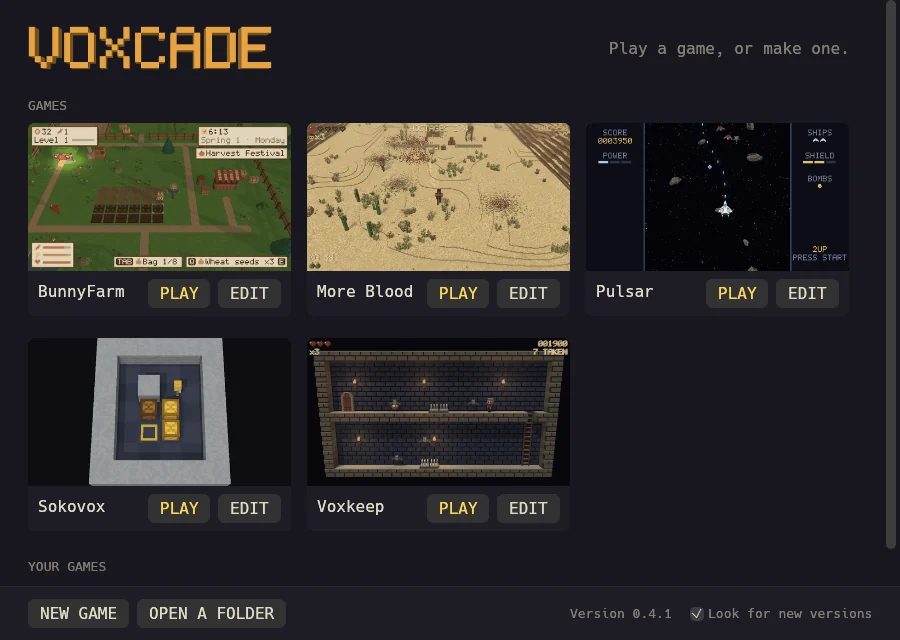
Then: make games
In the launcher, EDIT opens a game in the IDE, the workshop where games are made, and NEW GAME begins one of your own. The quick start shows the way.
Then: play together
Across the internet nothing needs opening. To host on the home network, Windows asks the first time whether Voxcade may use the network: allow it for private networks (an administrator has to agree). Cancelled by mistake? Windows Security, Firewall & network protection, Allow an app through firewall.
Linux
A PC with a current Linux (64-bit): Ubuntu 24.04, Linux Mint 22, Fedora 40, Debian 13 or newer, with Vulkan graphics drivers.
Download
Download the tar.gz file.
Download for Linux 23.3 MB
Unpack
In your file manager, right-click it and choose Extract Here. Or in a terminal, in the folder you downloaded it to:
tar xzf voxcade-0.6.0-linux-x86_64.tar.gzStart Voxcade
Open the new folder and double-click
start-voxcade.sh. If the file manager shows the text instead, right-click it and choose Run as a Program, or allow running it in its properties. The launcher opens: PLAY beside a game starts it. Or in a terminal:cd voxcade-0.6.0-linux-x86_64 ./voxcadeIf nothing appears, start it from a terminal as above: it says what is wrong.
GLIBC_2.39 not foundmeans the system is too old (Ubuntu 24.04, Linux Mint 22 and newer work); the first line of this shows the version:ldd --version
Then: make games
In the launcher, EDIT opens a game in the IDE, the workshop where games are made, and NEW GAME begins one of your own. The quick start shows the way.
Then: play together
Across the internet nothing needs opening. To host on the home network with a firewall turned on (ufw, as on Ubuntu), let the game in:
sudo ufw allow 26500/udpGood to know
Keys and pads
A keyboard or a gamepad. Every game shows its keys as it begins; all of them, to look up and to change, are under pause (Escape), SETTINGS, CONTROLS. SETTINGS also has the volume, fullscreen and the language.
A new version
The launcher says when a new version is there. UPDATE NOW fetches it, checks it and puts it in place; what was there before goes to the folder before-update. Your own games, settings, high scores and saves stay. Looking for new versions can be switched off in the launcher.
Removing it
Delete the folder. Settings stay in %APPDATA%\voxcade (Windows) or ~/.config/voxcade (Linux) until you delete that too; games you made are in Voxcade in your home folder.
If it will not start
If graphics are the trouble, Voxcade says so in a window: update your graphics driver. If the game runs slowly, SETTINGS, VIDEO, SHADOWS set lower helps. If nothing appears at all on Linux, start it from a terminal as in step 3.